PowerDNS
設定頁說明
Create Zone
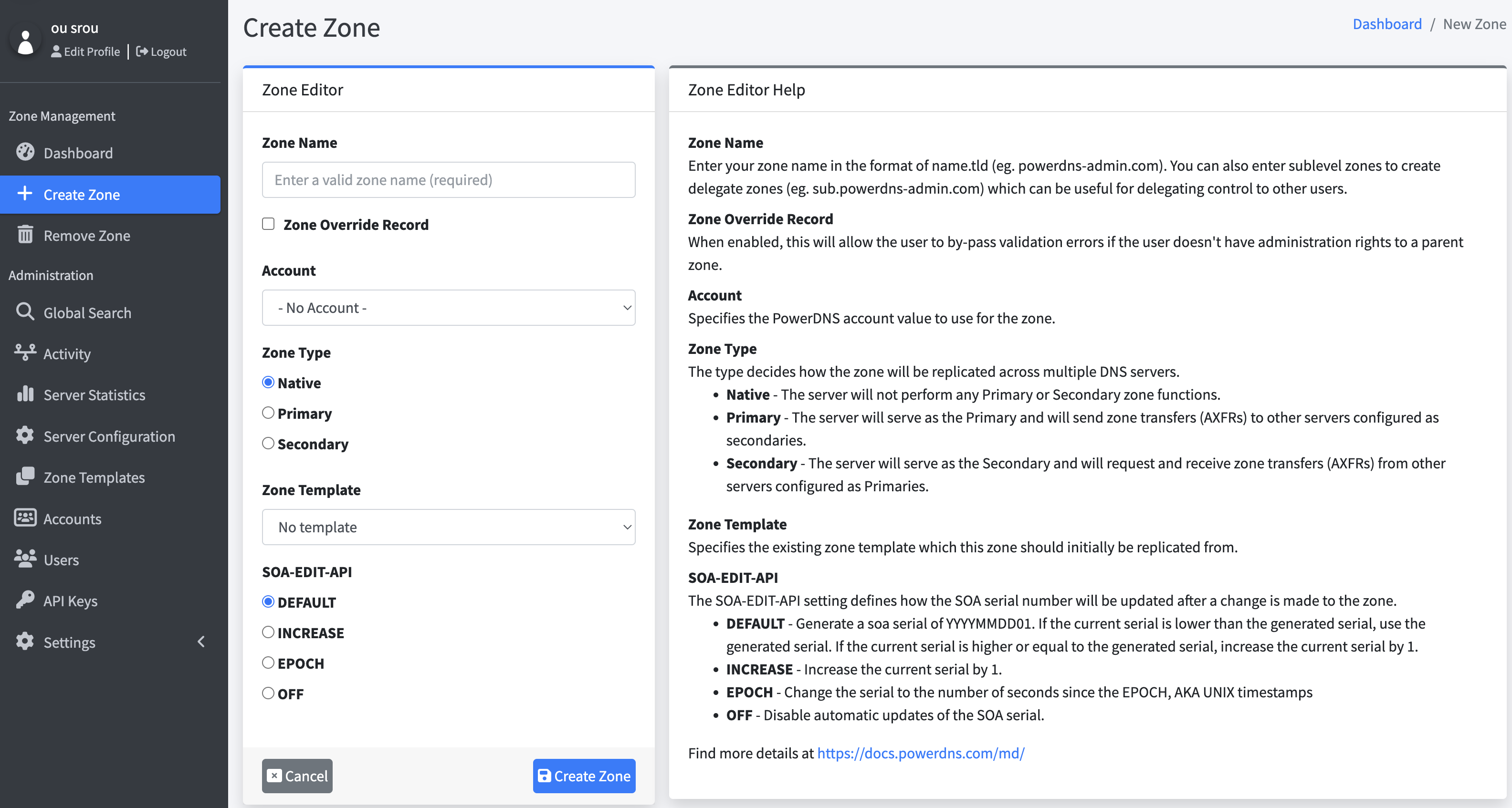
區域名稱 (Zone Name)
請輸入您的區域名稱,格式為 名稱.頂級域(例如 powerdns-admin.com)。您也可以輸入子區域來建立委派區域(例如 sub.powerdns-admin.com),這對於將控制權委派給其他使用者非常有用。
區域覆蓋記錄 (Zone Override Record)
啟用後,即使使用者沒有管理父區域的權限,也能繞過驗證錯誤。
帳戶 (Account)
指定該區域所使用的 PowerDNS 帳戶資訊。
區域類型 (Zone Type)
區域類型決定該區域如何在多台 DNS 伺服器之間進行同步:
- 原生 (Native):伺服器不會執行主要(Primary)或次要(Secondary)區域的功能。
- 主要 (Primary):伺服器作為主要 DNS 伺服器,並會將區域資料傳輸(AXFR)至其他設定為次要的伺服器。
- 次要 (Secondary):伺服器作為次要 DNS 伺服器,並會從設定為主要的伺服器請求並接收區域資料傳輸(AXFR)。
區域範本 (Zone Template)
指定此區域最初應從哪個現有的區域範本複製設定。
SOA-EDIT-API 設定
SOA-EDIT-API 設定用於決定當區域變更時,如何更新 SOA (Start of Authority) 序號:
- DEFAULT(預設):產生
YYYYMMDD01格式的 SOA 序號。- 若當前序號小於產生的序號,則使用產生的序號。
- 若當前序號大於或等於產生的序號,則將當前序號加 1。
- INCREASE(遞增):將當前 SOA 序號加 1。
- EPOCH(時間戳記):將序號設定為從 Unix 紀元(1970-01-01 00:00:00 UTC)以來的總秒數。
- OFF(關閉):停用 SOA 序號的自動更新。
這樣的翻譯較符合台灣地區的用語習慣,如果有特定的用詞需求也可以再進一步調整!
【PowerDns】安裝
https://doc.powerdns.com/recursor/getting-started.html#debian-based-distributions
關閉 systemd-resolved,讓出 port 53
sudo systemctl stop systemd-resolved
sudo systemctl disable systemd-resolved
install pdns-recursor
# 安裝 powerdns recursor
apt-get install pdns-recursor
# 尋找版本
# pdns_recursor --version

root@dockr204:/etc/powerdns# pdns_recursor --version
Aug 08 17:34:07 PowerDNS Recursor 4.6.0 (C) 2001-2021 PowerDNS.COM BV
Aug 08 17:34:07 Using 64-bits mode. Built using gcc 11.2.0.
Aug 08 17:34:07 PowerDNS comes with ABSOLUTELY NO WARRANTY. This is free software, and you are welcome to redistribute it according to the terms of the GPL version 2.
設定資料夾在 /etc/powerdns
root@dockr204:/etc/powerdns# ll /etc/powerdns
total 76
drwxr-xr-x   3 root root  4096 Aug  8 17:31 ./
drwxr-xr-x 104 root root  4096 Aug  8 17:24 ../
-rw-r--r--   1 root root 58718 Mar 12  2022 recursor.conf
drwxr-xr-x   2 root root  4096 Mar 12  2022 recursor.d/
-rw-r--r--   1 root root   272 Mar 12  2022 recursor.lua


# ll /etc/powerdns/recursor.d
total 8
drwxr-xr-x 2 root root 4096 Mar 12  2022 ./
drwxr-xr-x 3 root root 4096 Aug  8 17:31 ../


# cat recursor.lua
-- Debian default Lua configuration file for PowerDNS Recursor

-- Load DNSSEC root keys from dns-root-data package.
-- Note: If you provide your own Lua configuration file, consider
-- running rootkeys.lua too.
dofile("/usr/share/pdns-recursor/lua-config/rootkeys.lua")

# cat recursor.conf | grep -v "#" | grep -v "^$"
config-dir=/etc/powerdns
hint-file=/usr/share/dns/root.hints
include-dir=/etc/powerdns/recursor.d
local-address=127.0.0.1
lua-config-file=/etc/powerdns/recursor.lua
public-suffix-list-file=/usr/share/publicsuffix/public_suffix_list.dat
quiet=yes
security-poll-suffix=- 備份預設檔,建立新的設定檔
sudo systemctl disable systemd-resolved
sudo systemctl stop systemd-resolved
修改 recursor.conf
api-key=AAAABBBDDDCCC
webserver=yes
webserver-port=8082
webserver-address=0.0.0.0
webserver-allow-from=0.0.0.0/0

allow-from=127.0.0.1, 192.168.0.0/24

# 查 abc.com.tw 的交給本地 Authoritative Server(UDP 54)
forward-zones=abc.com.tw=127.0.0.1:54

# 其他一律轉外部解析
forward-zones-recurse=.=8.8.8.8, .=168.95.1.1

local-address=0.0.0.0
local-port=53

setgid=pdns
setuid=pdns

logging-facility=0
max-negative-ttl=3600
quiet=yes

# 其他設定
config-dir=/etc/powerdns
hint-file=/usr/share/dns/root.hints
include-dir=/etc/powerdns/recursor.d
lua-config-file=/etc/powerdns/recursor.lua- 設定自動啟動及重啟 PowerDNS-Recursor 服務
systemctl start pdns-recursor
systemctl enable pdns-recursor
# 安裝權威伺服器
# 安裝權威伺服器
sudo apt-get install pdns-server- 備份預設檔,建立新的設定檔
mv /etc/powerdns/pdns.conf /etc/powerdns/pdns.conf.bak
vim /etc/powerdns/pdns.conf
【PowerDns】pdnsutil 速查表
OK!下面幫你把 pdnsutil 常用指令 與 PowerDNS Authoritative REST API 的核心用法,整理成一份實用速查表(適用你現在的 SQLite 後端設定)。指令預設在伺服器上執行,API 範例用 curl。
pdnsutil 速查表
小重點:
pdnsutil會用/etc/powerdns/pdns.conf的後端設定(像你現在的gsqlite3-database=/var/lib/powerdns/pdns.db)。一般情況不需要在指令後面再帶資料庫連線字串。
區域(Zone)管理
# 建立 Zone(會自動產生 SOA/NS)
pdnsutil create-zone example.com ns1.example.com

# 列出所有 Zone
pdnsutil list-all-zones

# 查看某個 Zone 內容
pdnsutil list-zone example.com

# 刪除 Zone(不可逆)
pdnsutil delete-zone example.com

# 升版本(序號 +1;SOA serial)
pdnsutil increase-serial example.com

# 變更 Zone 類型(Native/Master/Slave)
pdnsutil set-kind example.com Native
pdnsutil set-kind example.com Master
pdnsutil set-kind example.com Slave
紀錄(RRsets)管理
# 新增一筆紀錄
pdnsutil add-record example.com www A 300 203.0.113.10

# 取代整個 RRset(同名同型別的多筆紀錄一次重設)
pdnsutil replace-rrset example.com www A "300" "203.0.113.10" "203.0.113.11"

# 刪除整個 RRset
pdnsutil delete-rrset example.com www A

# 設定單筆紀錄 TTL(或用 replace-rrset 一次調整)
pdnsutil set-ttl example.com www A 600
主從複寫(AXFR)與通知
# 設定 Master 的來源 IP(Slave/Native 也可設)
pdnsutil set-masters example.com 10.0.0.10 10.0.0.11

# 設定通知對象(NOTIFY 將發送給這些 IP)
pdnsutil set-notify example.com 10.0.0.20 10.0.0.21

# 手動觸發 NOTIFY
pdnsutil notify example.com

# 加入 supermaster(供 Slave 自動加入)
pdnsutil add-supermaster 10.0.0.10 ns1.example.com accountA
pdnsutil list-supermasters
pdnsutil delete-supermaster 10.0.0.10
檢查、調整與匯入/匯出
# 檢查 Zone 合法性(語法/權威性/必要紀錄)
pdnsutil check-zone example.com

# 調整/整齊化紀錄(例如 DNSSEC/NSEC3 相關或大小寫等)
pdnsutil rectify-zone example.com

# 從 zonefile 匯入
pdnsutil load-zone example.com /path/to/zonefile

# 匯出為 zonefile(BIND 格式)
pdnsutil export-zone example.com /tmp/example.com.zone
Meta 與額外屬性
# 設/查/清除 Zone meta(AXFR 策略、SOA 編輯模式等)
pdnsutil set-meta example.com SOA-EDIT-API INCEPTION-INCREMENT
pdnsutil get-meta example.com
pdnsutil clear-meta example.com SOA-EDIT-API
DNSSEC(若需要)
# 以「API 模式」啟用 DNSSEC(變更由 API/工具觸發會自動調整 serial)
pdnsutil secure-zone --api example.com

# 建/列/刪 key
pdnsutil add-zone-key example.com ksk active rsasha256 2048
pdnsutil list-keys example.com
pdnsutil remove-zone-key example.com <keyid>

# NSEC3 啟用/調整
pdnsutil set-nsec3 example.com "1 0 10 abcd1234"   # 參數: flags optout iterations salt
pdnsutil unset-nsec3 example.com

# 關閉 DNSSEC(謹慎!)
pdnsutil disable-dnssec example.com
PowerDNS Authoritative REST API 速查
啟用 API(pdns.conf)
你已經啟用,重點如下:
api=yes
api-key=你的長隨機字串
webserver=yes
webserver-address=0.0.0.0
webserver-port=8081
webserver-allow-from=0.0.0.0/0   # 建議上線時限縮來源段
變更後
systemctl restart pdns。呼叫 API 時請加 Header:X-API-Key: <你的key>
基底 URL 一般是:
http://<host>:8081/api/v1
伺服器 ID 預設是 localhost:
/api/v1/servers/localhost/...
範例:列出 Zone
curl -s -H 'X-API-Key: <APIKEY>' \
  http://127.0.0.1:8081/api/v1/servers/localhost/zones
建立 Zone(POST /zones)
curl -s -X POST -H 'X-API-Key: <APIKEY>' -H 'Content-Type: application/json' \
  -d '{
    "name": "example.com.",
    "kind": "Native",           // 也可 "Master" 或 "Slave"
    "masters": [],              // Slave 時填 Master IP 列表
    "nameservers": ["ns1.example.com.", "ns2.example.com."],
    "soa_edit_api": "INCEPTION-INCREMENT",
    "rrsets": [                 // 可選:同時帶入初始 RRsets
      {
        "name": "www.example.com.",
        "type": "A",
        "ttl": 300,
        "changetype": "REPLACE",
        "records": [
          {"content": "203.0.113.10", "disabled": false}
        ]
      }
    ]
  }' \
  http://127.0.0.1:8081/api/v1/servers/localhost/zones
修改/新增/刪除 RRsets(PATCH /zones/{zone})
用
changetype: REPLACE或DELETE。name要以「尾巴有點」的 FQDN。
curl -s -X PATCH -H 'X-API-Key: <APIKEY>' -H 'Content-Type: application/json' \
  -d '{
    "rrsets": [
      {
        "name": "www.example.com.",
        "type": "A",
        "ttl": 300,
        "changetype": "REPLACE",
        "records": [
          {"content": "203.0.113.10", "disabled": false},
          {"content": "203.0.113.11", "disabled": false}
        ]
      },
      {
        "name": "old.example.com.",
        "type": "A",
        "changetype": "DELETE",
        "records": []
      }
    ]
  }' \
  http://127.0.0.1:8081/api/v1/servers/localhost/zones/example.com.
讀取 Zone(GET /zones/{zone})
curl -s -H 'X-API-Key: <APIKEY>' \
  http://127.0.0.1:8081/api/v1/servers/localhost/zones/example.com.
重新整理/通知
-
重新檢查/AXFR(Slave 取主檔):
/zones/{zone}/axfr-retrieve(POST) -
發送 NOTIFY:
/zones/{zone}/notify(POST)
# 例:觸發 NOTIFY
curl -s -X POST -H 'X-API-Key: <APIKEY>' \
  http://127.0.0.1:8081/api/v1/servers/localhost/zones/example.com./notify
統計 & 健康
# 伺服器資訊
curl -s -H 'X-API-Key: <APIKEY>' \
  http://127.0.0.1:8081/api/v1/servers

# 統計值(QPS、響應碼等)
curl -s -H 'X-API-Key: <APIKEY>' \
  http://127.0.0.1:8081/api/v1/servers/localhost/statistics
清快取(Authoritative 有限;常見在 Recursor)
curl -s -X PUT -H 'X-API-Key: <APIKEY>' \
  http://127.0.0.1:8081/api/v1/servers/localhost/cache/flush
常見實務小提醒
-
你把服務綁在
local-port=54,本機測試dig要記得-p 54。 -
API 的
name、nameservers、zoneFQDN 都要以.結尾(PDNS API 慣例)。 -
webserver-allow-from=0.0.0.0/0方便測試,但上線環境務必限縮來源段或套防火牆。 -
改 RRsets 後若
SOA-EDIT-API有設會自動處理 serial;否則記得用increase-serial。 -
若搭配 Recursor/外層 dnsdist,有時 Authoritative 的變更需要幾秒才被上層 cache 反映。