【powershell】PowerView
PS C:\Tools> Import-Module .\PowerView.ps1
PS C:\Tools> Get-NetDomain
PS C:\Tools> Get-NetUser
PS C:\Tools> Get-NetUser | select cn
PS C:\Tools> Get-NetUser | select cn,pwdlastset,lastlogon
PS C:\Tools> Get-NetGroup | select cn
PS C:\Tools> Get-NetGroup "Sales Department" | select member

member
------
{CN=Development Department,DC=corp,DC=com, CN=pete,CN=Users,
DC=corp,DC=com, CN=stephanie,CN=Users,DC=corp,DC=com}
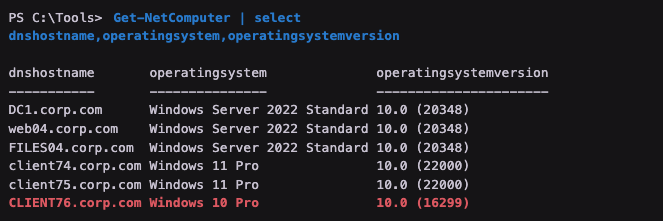
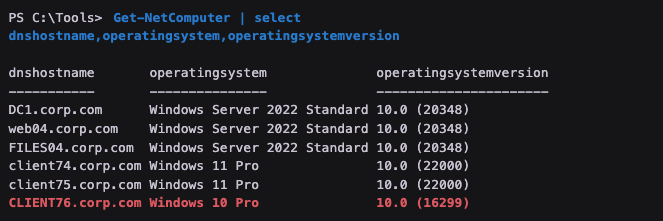
PS C:\Tools> Get-NetComputer | select operatingsystem,dnshostname

operatingsystem              dnshostname
---------------              -----------
Windows Server 2022 Standard DC1.corp.com
Windows Server 2022 Standard web04.corp.com
Windows Server 2022 Standard FILES04.corp.com
Windows 11 Pro               client74.corp.com
Windows 11 Pro               client75.corp.com
Windows 10 Pro               CLIENT76.corp.com
PS C:\Tools> Get-NetComputer | select dnshostname,operatingsystem,operatingsystemversion
# 查看登入帳戶在哪台機器有ㄇadmin帳號
PS C:\Tools> Find-LocalAdminAccess

client74.corp.com
PS C:\Tools> Get-NetSession -ComputerName files04 -v
VERBOSE: [Get-NetSession] Error: Access is denied

PS C:\Tools> Get-NetSession -ComputerName web04 -v
VERBOSE: [Get-NetSession] Error: Access is denied
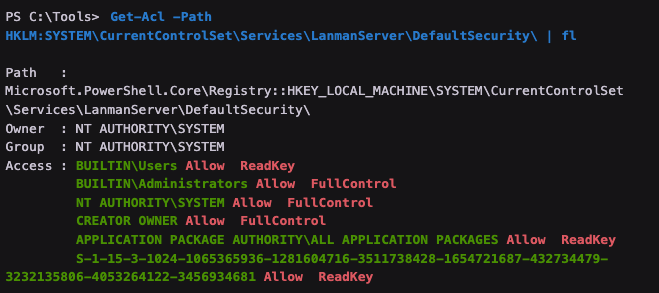
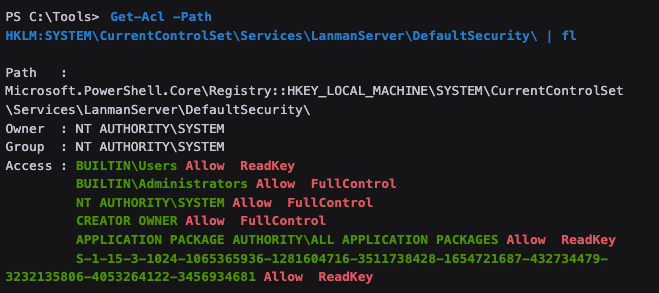
PS C:\Tools> Get-Acl -Path HKLM:SYSTEM\CurrentControlSet\Services\LanmanServer\DefaultSecurity\ | fl

#輸出顯示了擁有FullControl或ReadKey權限的組和用戶,這意味著它們都可以讀取SrvsvcSessionInfo密鑰本身。